The Ultimate Setup Guide for Your Keychron B36
Introduction
The Keychron B36 has emerged in the mechanical keyboard space as a compelling option for users who want a compact layout without sacrificing keys, connectivity, or customization. Built around a near-full-size or 96% layout, the B36 aims to balance desk real estate, function-row access, and ergonomic stability. This guide walks through everything a buyer or new owner needs to know to set up the B36 for daily work, creative tasks, and gaming—covering physical setup, switch selection, keycap choices, software and firmware considerations, acoustics, and real-world usage scenarios.
Product Overview and Analysis
At its core, the Keychron B36 targets users who want a tighter footprint than a traditional full-size board while keeping nearly all essential keys (including a numpad and full function row). The B36 is typically available in several configurations: wired-only or wireless with multi-device Bluetooth, hot-swap or soldered PCBs, different case materials (plastic or aluminum top case), and a range of switch options. These variants mean the experience can vary widely—so the setup process benefits from a methodical approach.
Layout and Form Factor
The 96% layout is the defining characteristic of the B36. It places the numpad and navigation cluster closer to the alphanumeric area by compressing whitespace and aligning keys into a compact footprint. For office environments where number entry is frequent—accounting, data entry, and spreadsheet-heavy workflows—the layout reduces mouse travel without needing a separate numpad.
Build Quality and Materials
Depending on model, the B36 may have options for an aluminum top frame or a reinforced plastic case. Aluminum variants add weight and stability, which benefits typing stability and a premium feel; plastic variants are lighter and more portable. Keychron often tunes the internal plate and foam to manage typing acoustics—owners may still choose to add aftermarket dampening for a quieter desk setup.
Switch Options and Typing Experience
Switch choice is among the most impactful setup decisions. The B36 is commonly available with linear, tactile, and clicky switch choices from Keychron’s in-house line or third-party options. Hot-swap variants let owners test and change switches without soldering; soldered PCBs require more commitment but can be marginally more secure for long-term use. For general office work, tactile switches provide feedback without loud clicks; creatives and writers sometimes prefer the smoother travel of linear switches, while those who enjoy audible key feedback may choose clicky switches—understanding the sound profile (and how it fits in shared spaces) is important.
Connectivity and Battery Life
Wireless models usually support Bluetooth multi-device pairing and USB-C wired mode for low-latency tasks or charging. Battery capacity varies by configuration and backlight settings; users who rely heavily on RGB or per-key lighting should expect shorter battery cycles than those who use the keyboard backlight minimally. For users who prioritize consistent low-latency performance—competitive gamers or streamers—wired USB-C tends to be preferable.
Keycaps, Stabilizers, and Sound Tuning
Most B36 units ship with ABS or PBT keycaps depending on variant. PBT keycaps are generally more resistant to shine and better for long-term durability. Stabilizers (spacebar, enter, shift) can be a weak link in stock setups; many users lube stabilizers to reduce rattle and improve feel. For acoustic tuning, common modifications include adding foam inside the case, changing the plate material (if the keyboard supports it), or using different keycap profiles to alter the sound and typing feel.
Real-World Use Cases: Who Benefits Most
The B36 is a versatile choice with clear strengths across several real-world scenarios.
Productivity and Office Work
Accountants, analysts, and administrative professionals who need a numpad but prefer a compact desk footprint will find the 96% layout efficient. The proximity of the number keys to the typing area reduces reaching and improves workflow speed in numeric tasks. Bluetooth support allows presenters and meeting hosts to switch devices quickly between laptops, tablets, or phones for hybrid work setups.
Looking for the best Laptops & Computers deals on Amazon?
Shop Amazon →Programmers and Writers
Programmers appreciate a near-full layout for access to function keys, dedicated arrow clusters, and number rows—without the extra width of a full-size board. Writers benefit from balanced key placement and usually prefer tactile or linear switches depending on their typing rhythm. Programmable layers and macros (if supported) can speed repetitive coding patterns or hotkey combinations.
Creative Professionals
Designers and content creators who use keyboard shortcuts extensively (in tools like Photoshop, Premiere Pro, or CAD software) will value the compactness combined with full functionality. The B36’s layout keeps modifier keys and function rows within easy reach, enabling efficient multitasking between tools and palettes.
Casual and Competitive Gaming
While the B36 is not a full-width tenkeyless tournament board, it still suits gamers who prefer compact keyboards with full functionality. Wired mode is recommended for low-latency play. The presence of a numpad can be useful for certain simulation or indie games that utilize additional keybinds.
Detailed Setup Guide
The following steps guide the setup and tuning process from unboxing to an optimized daily driver.
1. Initial Unboxing and Inspection
- Check the keyboard for shipping damage and confirm the included accessories (USB-C cable, extra keycaps, keycap puller, documentation).
- Note the factory switch type and whether the PCB is hot-swappable; this determines how easily switches can be changed later.
2. Physical Placement and Ergonomics
- Position the keyboard so the forearms are parallel to the desk. Use a wrist rest if the desk height is not adjustable.
- Consider the angle: many Keychron models ship with adjustable feet—choose the incline that minimizes wrist extension during long typing sessions.
3. Key Switch Selection and Replacement
- If the board is hot-swappable, experiment with different switch types. Start with the factory switches, then try linear, tactile, and heavier springs to match typing preference.
- For non-hot-swap variants, plan switch choice carefully; lubing the switches and stabilizers can dramatically improve feel and sound.
4. Keycap Replacement
- Upgrade to a PBT set if crisp texture and longevity are priorities. Consider profile (Cherry, OEM, SA) as this affects hand posture and comfort.
- Verify the keycap set supports the 96% layout—some sets designed for standard ANSI layouts may not include the extra keys present on a compact numpad layout.
5. Stabilizer and Sound Tuning
- Lube stabilizers with a suitable stabilizer lubricant to reduce rattle. Popular approaches include clipping stabilizers, adding tape mods, and using dielectric grease sparingly.
- Add case foam or switch foam (if supported) to dampen hollowness and produce a more muted, pleasant sound profile for shared spaces.
6. Connectivity Configuration
- Pair Bluetooth devices in sequence, naming each profile to avoid confusion. Many users reserve wired mode for gaming and Bluetooth for multi-device productivity.
- For consistent performance, connect via USB-C for tasks requiring the lowest latency and when charging the battery.
7. Firmware and Software
- Check Keychron’s support pages for firmware updates and utility tools—updates may provide bug fixes or additional functionality like key remapping or macro layers.
- For advanced remapping, use open-source tools if Keychron’s utility is limited; ensure compatibility with the operating system and back up the original configuration before flashing custom firmware.
8. Maintenance
- Periodically clean keycaps and the plate area to prevent key sticking. Remove keycaps and use compressed air or a soft brush to remove debris.
- Replace batteries when performance drops; lithium polymer battery care best practices (avoid deep discharge, store at partial charge if unused for long periods) extend longevity.
Pros & Cons
- Pros
- Compact 96% layout keeps nearly all keys while saving desk space.
- Multiple configuration options (hot-swap, material choices) make it adaptable to different users.
- Good balance between productivity and gaming functionality.
- Multi-device Bluetooth on wireless variants increases workflow flexibility.
- Upgradability: many variants support switch and keycap swaps for personalization.
- Cons
- Layout may have a learning curve for users moving from full-size or tenkeyless boards.
- Soldered versions limit later switch experimentation without desoldering skills.
- Stock stabilizers and acoustics may require modding for an optimal sound and feel.
- Wireless variants can have shorter battery life if backlighting is used heavily.
How the B36 Compares
Below is a practical table comparing the typical Keychron B36 configuration to two commonly referenced Keychron models to help prospective buyers choose the right fit for their needs.
| Feature | Keychron B36 (96%) | Keychron K2 (75% / compact) | Keychron K10 (Full-size) |
|---|---|---|---|
| Layout | 96% (compact full functionality) | 75% (smaller, fewer dedicated keys) | Full-size (complete numpad and function row) |
| Hot-swap Option | Available on select variants | Available on select variants | Less common on full-size variants |
| Wireless | Bluetooth multi-device on some models | Bluetooth multi-device commonly supported | Often wired or limited wireless options |
| Portability | Moderate (more compact than full-size) | High (smaller footprint) | Low (largest footprint) |
| Best for | Users needing near-full functionality in compact space | Travel and space-conscious setups | Users who need full numpad and traditional layout |
Buying Guide: What to Prioritize
When choosing a B36 variant or configuring the keyboard post-purchase, buyers should consider these priorities:
1. Layout Needs
Decide whether a 96% layout is preferable to tenkeyless (TKL) or full-size. If frequent number entry is essential, the 96% delivers number pad convenience without the width of a full-size board.
2. Hot-Swap vs. Soldered
Buyers who anticipate trying different switches should choose a hot-swap PCB for the ease of experimentation. For those comfortable soldering, soldered PCBs are stable but less flexible.
Find top-rated Laptops & Computers products at great prices.
Browse Now →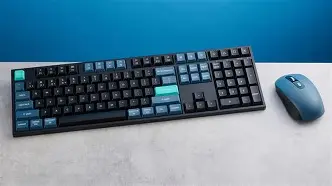
3. Switch Type and Sound
Consider the working environment. Linear switches are quieter and favored for single-user spaces or late-night typing; tactile switches provide feedback helpful for accuracy; clicky switches are loud and may not be appropriate in shared spaces.
4. Keycap Material and Profile
PBT keycaps resist shine and often feel better over time. Keycap profile influences hand posture—test profiles if possible before committing to a full set.
5. Connectivity and Battery
If mobility and device switching are priorities, wireless variants with robust Bluetooth pairing capability are beneficial. If maximum performance is required, wired mode via USB-C is the safer choice.
6. Firmware and Customization
Check whether the B36 variant supports firmware updates or remapping. Advanced users may want QMK/VIA or vendor software for layer programming and macros.
7. Acoustic and Ergonomic Modding
Budget for aftermarket stabilizers, lube, foam, or new keycaps if a refined sound and feel are desired. These small investments often yield the largest improvement in daily typing satisfaction.
Conclusion
The Keychron B36 is a thoughtful option for those who want most of a full-size keyboard's functionality while conserving desk space. Its 96% layout serves a wide spectrum of users: from data professionals who need a numpad to creatives and programmers who value compactness without sacrificing key access. The right configuration—hot-swap or soldered, aluminum or plastic, linear or tactile switches—depends on personal priorities like upgradability, acoustics, and portability. With deliberate setup—paying attention to switches, stabilizers, keycaps, and connectivity—owners can turn the B36 into a comfortable, high-performing centerpiece of a productive workspace.